
Short on time? Here’s what you need to know about Google’s Android Halo:
✅ Android Halo creates a persistent AI Hub within your smartphone’s status bar, providing real-time updates on AI agent activities.
✅ It supports seamless interaction with both Google’s Gemini AI and compatible third-party agents via a containerized interface.
✅ Ensures transparency, progress tracking, and user input requests directly from your mobile screen, enhancing AI integration without disruption.
✅ Avoid confusing AI multitasking by relying on Halo’s isolated containers that prevent agents from overlapping or demanding constant attention.
Android Halo: Redefining AI Hub Presence on Your Smartphone with Google’s Innovation
Google’s unveiling of Android Halo marks a significant shift in how Artificial Intelligence integrates into mobile technology. Embedded in the status bar of the smartphone interface, Android Halo establishes a dedicated AI hub that serves as a continuous communication channel between users and their AI agents. Unlike traditional AI assistants that require launching separate apps or constant notifications, Halo maintains a subtle presence, offering live progress updates, requests for user inputs, and final results without interrupting workflows. This approach aligns with evolving expectations for AI integration to be more intuitive and less intrusive.
By confining each AI agent in isolated containers within the status bar, Android Halo ensures that different agents do not interfere with one another. For example, if Gemini is managing a translation task while a third-party AI agent handles a calendar update, their notifications remain distinct and organized. This containerized design prevents AI chatter from overwhelming users, a critical feature for professionals relying on multitasking in fast-paced mobile technology environments. As Android Hundred and Seventeen (17) rolls out this feature, device manufacturers and developers will find a more consistent platform for integrating AI across their apps.
The architecture behind Android Halo also promotes transparency in AI behavior. Users gain clear insight into what each AI is doing in real time, which combats the common issue of opaque machine learning processes. The ability to send clarifications and receive stepwise updates directly through the status bar enhances trust and engagement, crucial when utilizing AI for sensitive tasks such as itinerary planning or cultural content mediation in smart tourism. This refined AI hub becomes an essential tool for professionals demanding clarity and control over automated assistance.
Such innovation from Google reflects a broader trend towards ambient AI experiences. Halo’s design philosophy of coexistence rather than interruption suggests a future where smartphones become personalized AI ecosystems, adapting fluidly to user needs. This complements emerging strategies like Google’s Gemini project, which aims to deliver next-generation AI capabilities seamlessly embedded within everyday devices. Industry observers note that Android Halo could be the missing link between Android and AI agents, as highlighted in Digital Trends’ deep dive.
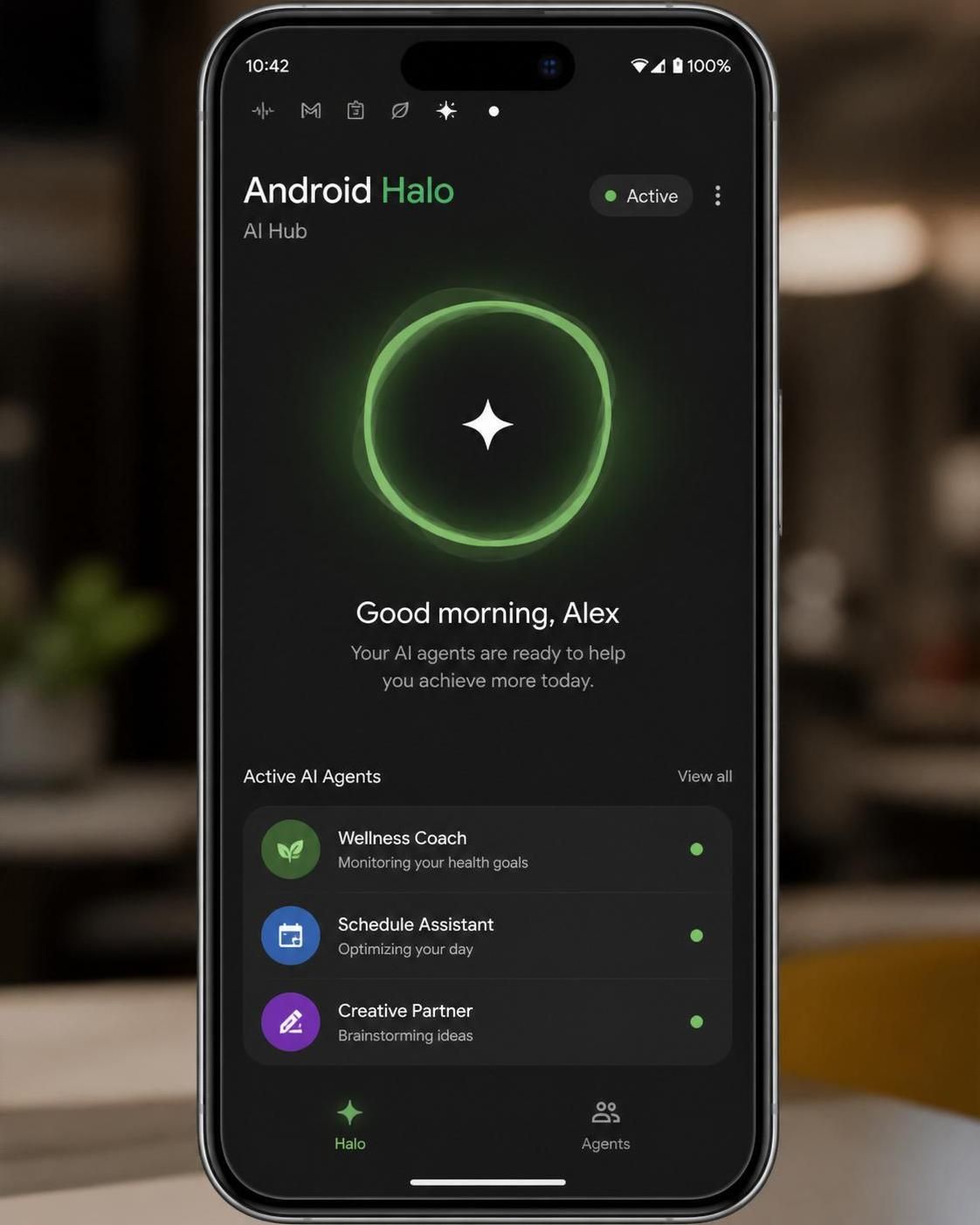
How Android Halo Enhances AI Transparency and Real-Time Interaction
One of Android Halo’s core strengths lies in its ability to communicate ongoing AI activities clearly within the device’s status bar. This functionality enables AI agents to report task progress such as uploads, transcriptions, or computations in real time. Rather than leaving users guessing if a process is active or stalled, the persistent visual indicators in the status bar offer subtle yet comprehensive feedback.
Consider a guide app leveraging AI-powered voice recognition during a cultural walking tour. Through Android Halo, the AI can display the status of audio transcription, ask for user clarifications, or signal when the next audio commentary is ready—all without pulling focus from other apps or requiring manual checks. This fluid interaction significantly improves user experience, especially in environments where constant screen switching is impractical.
Moreover, both Google’s native Gemini AI and third-party AI agents gain equal opportunities to use this communication layer. Each agent is locked within its container, a design that prevents any agent from ‘escaping’ or hijacking more screen space than needed. This architecture is critical for maintaining balance and privacy, especially when multiple AI agents compete for attention. It also raises an important discussion about open access versus preferential treatment for certain AI developers, a debate explored further in Android Gadget Hacks.
Halo’s interface is designed to support user inputs of varying types, including simple confirmations, detailed clarifications, or multi-step queries. This bidirectional communication makes the AI feel more cooperative rather than dictatorial. The status bar acts as a lightweight command center, streamlining interactions and minimizing the need to switch screens or open additional applications. This is a critical advancement in mobile AI usability, especially for professional users who demand efficiency and minimal distraction.
For developers, the introduction of the Android Halo layer offers fresh opportunities to innovate UI/UX for AI-centric applications. It encourages the design of agents that can intelligently share their workflows, detect user needs proactively, and gracefully handle interruptions, setting a new benchmark in tech innovation. The feature potentially paves the way for expanded AI roles in areas such as smart tourism, where dynamic voice interaction and timely multimedia content distribution are essential.
Integrating Android Halo within the Ecosystem of Mobile AI and Beyond
Android Halo does not operate in isolation but is part of Google’s broader AI ambitions, including the development of Gemini, its next-generation AI model poised to advance mobile intelligence. The seamless integration of Android Halo into Android 17 devices serves as a platform-level upgrade that extends AI capabilities beyond standalone apps to the core smartphone interface. This marks a transformational moment in mobile AI, supporting context-aware interactions where multiple AI agents collaborate or operate independently with minimal user oversight.
From a practical perspective, Android Halo facilitates:
- 📱 Organized multitasking between different AI agents without interface clutter.
- 🕒 Real-time progress visualization that informs the user about ongoing tasks.
- 🤖 Direct input handling allowing users to provide feedback or clarifications immediately.
- 🔒 Enhanced security by isolating agents within dedicated containers, reducing risks of data crossover.
For example, a museum guide app might use Halo to simultaneously update the visitor’s location AI while transcribing descriptive audio content, creating an immersive and uninterrupted cultural visit. Such layered interactions demonstrate Android’s evolution into a sophisticated AI hub where mobile AI works behind the scenes but provides continuous value. Google’s commitment to accessible and transparent AI enhances the appeal of adopting devices powered by Android 17 for business and creative professionals alike.
Further refinements in AI personalization are anticipated through upcoming applications that leverage Halo for enhanced user profiles and adaptive interaction patterns. Integrating with solutions like meta AI app personalization could optimize the user experience, enabling tailored AI responses based on user preferences, usage patterns, and contextual data. This synergy between system-level innovation and application development exemplifies the future direction of AI on mobile platforms.
Safeguarding Privacy and Security in the AI Hub Era with Android Halo
With AI agents continuously active and visible in the smartphone environment, privacy and security are paramount concerns. Android Halo’s design mitigates potential risks by sandboxing AI agents into independent containers that strictly limit data and interface sharing. This segmentation ensures that while multiple AI agents coexist on a single device, sensitive information handled by one agent remains inaccessible to others, protecting user privacy.
Google has addressed some open access risks associated with this new AI layer. The platform enforces controlled permissions and establishes clear boundaries for agent operation within the status bar. This prevents overreach or unauthorized access by third-party agents, a vital consideration as Android becomes a battleground for competing AI services. The transparent and secure design described at Google I/O helps build confidence among users wary of AI misuse.
From a technical standpoint, developers must adhere to strict guidelines when implementing AI agents compatible with Android Halo. These include:
- 🔐 Ensuring data isolation protocols are maintained for each agent container.
- 👁 Limiting agent visibility to only the status bar to avoid UI clutter.
- ⚙ Enabling efficient communication with minimal battery and resource consumption.
- 📝 Providing clear user control over AI agent activation and permissions.
These precautions align with best practices for privacy-preserving mobile AI and are essential to fostering trust. With AI taking center stage on smartphones, safeguarding the balance between functionality and user rights remains a top priority.
Practical Applications of Android Halo for Touristic and Cultural Experiences
In the realm of smart tourism and cultural mediation, Android Halo’s capabilities offer concrete benefits for professionals and end-users alike. The persistent AI Hub facilitates dynamic, real-time audio guide updates, voice input processing, and contextual notifications, enriching visitor engagement without technical complexity.
Tour guides and cultural institutions can leverage Android Halo to deliver multi-agent AI services: voice recognition engines transcribing visitor feedback, AI-driven content tailored to location, and intelligent scheduling agents optimizing visit flows. This integrated experience vastly improves the quality and accessibility of guided visits, especially in outdoor or crowded settings.
For example, Grupem’s approach to smart tourism aligns well with Android Halo’s features. Using AI-powered voice apps and transcription tools optimized for Android 17, organizers can create immersive, multi-lingual audio experiences that respond to visitor inputs detected and managed within the AI Hub. This synergy simplifies deployment and enhances user satisfaction.
Mobile operators and application developers in the tourism sector are encouraged to explore how Android Halo can serve as a foundational AI layer, supporting diverse smart city and cultural projects. This innovation encourages a move away from cumbersome apps to fluid digital services, reducing technical barriers for users while opening new creative opportunities.
| 🚩 Use Case | 🤖 AI Features Enabled | 💡 Key Benefit |
|---|---|---|
| Guided cultural walks | Real-time transcription, multilingual voice interaction | Enhanced accessibility and visitor engagement |
| Museum audio guides | AI-driven contextual information updates, user input processing | Seamless immersive experiences without device switching |
| Event scheduling apps | Multi-agent coordination and progress tracking | Optimized visitor flow and resource use |
By adopting Android Halo, stakeholders in tourism and cultural sectors can harness the potential of mobile AI to transform how visitors interact with their environments, combining technology with user-centric design.
For professionals interested in deploying AI-powered voice solutions on Android devices, resources such as Grupem’s guide to voice typing on Android offer practical insights applicable alongside Halo’s capabilities.
