
In a digital era driven by automation and productivity tools, Google Voice is setting a new benchmark by integrating an AI-powered note taking feature directly into its voice recognition platform. This update marks a significant leap forward for professionals and everyday users who rely on seamless speech-to-text technology to manage communication and documentation effectively.
Peu de temps ? Voici l’essentiel à retenir :
- ✅ Google Voice enhances call productivity by automatically recording, transcribing, and summarizing conversations.
- ✅ AI automation via Gemini integration ensures organized, accessible notes delivered immediately after calls.
- ✅ User control and privacy are central, with recorded content accessible only to the call initiator and transparent notification to all parties.
How Google Voice’s AI-Powered Note Taking Revolutionizes Communication Efficiency
Google Voice has upheld its place as a versatile telephony service by evolving from a simple voice-over-IP platform to an integrated digital assistant that leverages cutting-edge AI technologies. The recent introduction of AI-powered note taking heralds a pivotal innovation enhancing user productivity during calls. This feature captures conversations in real time, transforming spoken dialogues into detailed, actionable records without the manual effort traditionally associated with note taking.
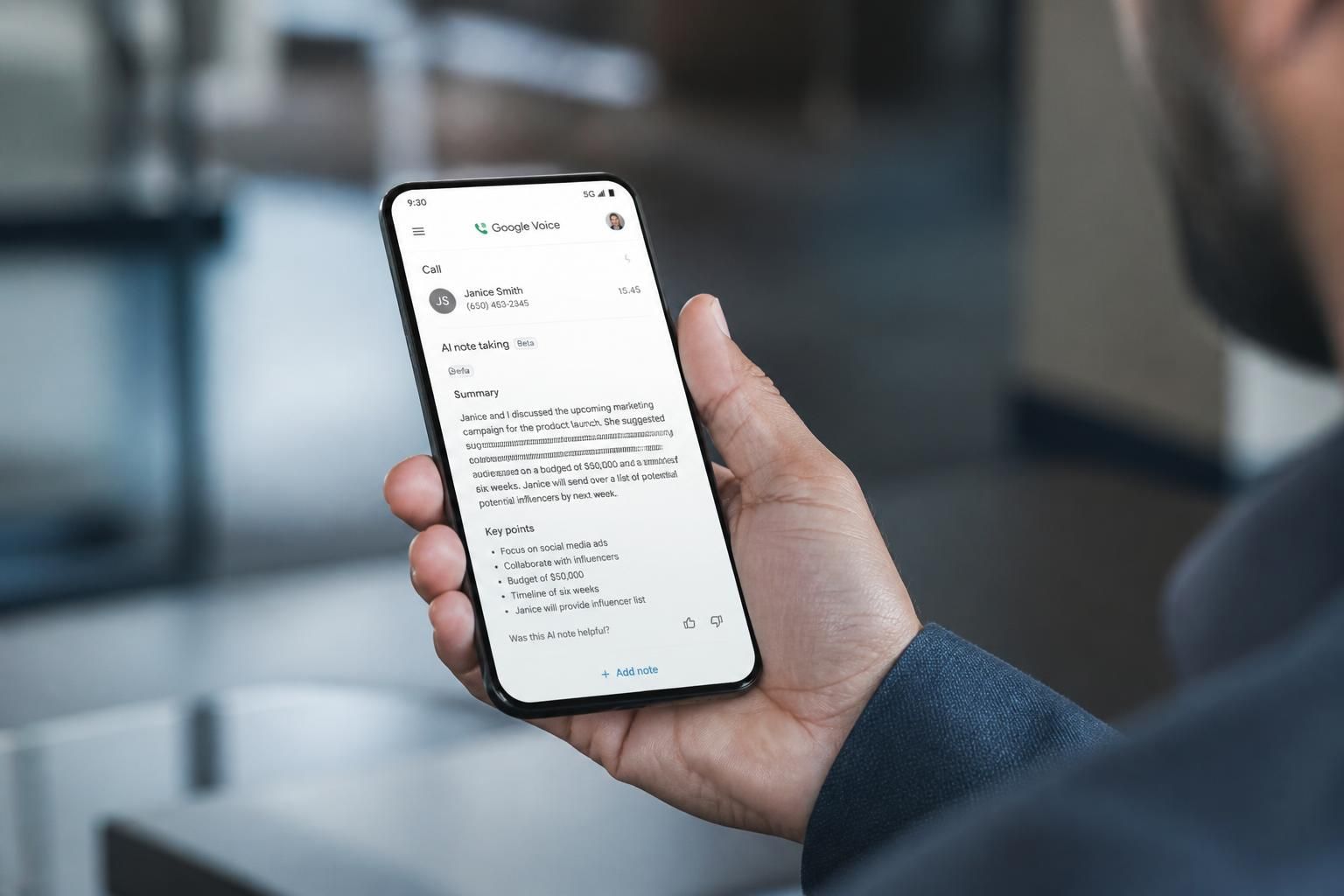
At its core, the system activates when users tap the ‘Notes’ button mid-call. From this moment, advanced voice recognition algorithms take charge: they record the conversation, generate a transcript using speech-to-text technology, and pass this data to Gemini, Google’s sophisticated AI engine, to extract meaningful insights. These insights are not mere verbatim transcripts; Gemini applies intelligent summarization techniques to highlight key points and organize action items, making post-call follow-up far more streamlined.
To further demonstrate the feature’s efficiency, consider a scenario frequently encountered by business professionals who conduct numerous client calls or project meetings. Without AI assistance, compiling minutes or action points often demands attention and time after the call, risking potential information loss or delayed follow-up. With Google Voice’s AI-powered enhancement, the notes and recordings are automatically emailed to the user, while a comprehensive archive remains accessible in the app for quick retrieval. This reduces administrative overhead dramatically and supports a more productive workflow.
Notably, this innovation also aligns well with the broader industry momentum captured at Google I/O 2025, where voice-assisted productivity tools gained significant emphasis. For users invested in Google’s ecosystem, this update synergizes with voice-based prompting in applications like Google Docs and Keep, as detailed by leading tech analysis. The integration fosters a seamless transition from verbal interaction to written documentation, supporting a natural workflow enhancement that transcends traditional typing or manual note taking.
Ensuring Privacy and User Control in AI-Driven Call Recording
With the increasing adoption of AI in personal communications, privacy concerns remain paramount. Google Voice’s approach to AI-powered note taking demonstrates a conscientious balance between innovation and user privacy—a critical factor for technologies handling sensitive verbal exchanges.
A defining feature is the transparency built into the recording process. When the AI note taking activates during a call, Google Voice plays an audio notification to inform all participants that the conversation is being recorded by an AI system. This respects legal frameworks and ethical standards by seeking informed consent implicitly during the interaction. Furthermore, access to the generated notes, transcripts, and audio files is strictly limited to the individual who initiated the AI capture, preventing unauthorized distribution or exposure of sensitive data.
This confidentiality protocol caters to diverse environments, particularly within professional sectors such as tourism guidance, cultural event coordination, and healthcare communications, where secure handling of conversation content is critical. The ability to control and restrict access builds user confidence, enabling more widespread adoption of AI automation tools.
Administrators managing Google Workspace, where Google Voice operates as part of the unified productivity suite, can activate or deactivate this feature through the Workspace Smart Feature Consent page. This centralized control accommodates organizational policies and ensures compliance with data protection regulations, confirming that adoption aligns with internal governance requirements.
In practical terms, this means that institutions like visitor centers utilizing solutions such as Grupem can integrate Google Voice’s note taking to streamline guide communications while maintaining strict confidentiality, enhancing the visitor experience without compromising on privacy or data security.
Optimizing Workflow: The Impact of AI-Powered Notes on Professional and Everyday Use
Adopting Google Voice’s innovative note taking feature translates to real benefits across various business sectors and day-to-day communication. The utility lies not only in capturing what is said but also in refining how the recorded information is organized and used afterward.
For instance, customer support teams can capitalize on automated transcripts and summaries to quickly identify client issues and required actions without sifting through lengthy call recordings. Similarly, project managers can retain accurate minutes from meetings conducted remotely, empowering efficient task delegation and deadline tracking. This level of automation significantly reduces errors introduced by manual note taking and ensures no critical details are lost in the handoff between internal teams.
In everyday contexts, individuals benefit from having a reliable digital assistant to document important reminders or confirmations during phone conversations. Whether scheduling appointments or confirming travel plans, the accuracy and immediacy of AI-generated notes improve personal organization and reduce the cognitive load linked to remembering verbal exchanges.
Below is a summary table illustrating key advantages across different user profiles and use cases:
| 📌 Use Case | 🚀 Benefits | 🔍 Key Features |
|---|---|---|
| Business Professionals | Faster meeting follow-ups, better accuracy | Call transcription, AI summarization, action item extraction |
| Customer Support Teams | Improved client issue tracking | Audio recording, searchable transcripts, note organization |
| Event Coordinators | Streamlined communication and logistics | Voice recognition, automatic note emails, in-app storage |
| Individual Users | Reliable personal reminders from calls | Speech-to-text, instant email delivery, secure archive |
Integrating these features allows professional workflows and private communications to coexist under a single technology umbrella, enhancing the overall experience via smart automation.
Setting Up and Using Google Voice’s AI Note Taking: Practical Guidelines
To maximize the benefits of Google Voice’s AI-powered note taking, users must navigate setup and operational guidelines with ease. New users will find the feature enabled automatically upon activation of their account, streamlining immediate access to AI productivity tools. For existing users, manual activation requires consenting to Google Workspace’s Smart Feature Consent—accessible via account settings in Gmail, Meet, or Voice apps.
This design ensures users retain control over the activation of AI tools, complying with organizational policies or personal preferences. The toggleable nature of this feature permits flexibility, allowing users to enable or disable note taking depending on the call context or privacy considerations.
Once active, the interface presents a simple button labeled ‘Notes’ during calls. Upon pressing this, the system begins recording and real-time transcription supported by Gemini, capturing all relevant speech information. At call end, the notes, summary, and audio file are automatically compiled and sent via email, while also stored efficiently within Google Voice for ongoing reference.
Furthermore, this setup seamlessly integrates with Google’s broader AI ecosystem. Users who utilize Google Docs or Keep benefit from complementary voice-based prompts and tools designed to unify note taking and task management. For professionals and organizations invested in streamlined communication solutions, Google Voice offers a scalable, easy-to-use toolset enhancing digital workflows without introducing complexity.
For more detailed instructions and support, Google provides a comprehensive resource guide accessible in its official support channels, ensuring users can troubleshoot or optimize settings based on personal or institutional needs.
The Strategic Role of Google Voice’s AI Innovations in the Future of Digital Communication
Google’s continuous strides in AI-powered technologies, demonstrated by the Voice app’s latest update, are indicative of a larger strategic vision to embed intelligent automation within everyday digital communication. By leveraging speech-to-text and AI summarization capabilities through Gemini, Google Voice is transforming conventional calls into rich, interactive experiences that support productivity and accessibility.
This innovation not only enhances how voices are captured and processed but also signifies a trend where digital assistants become integral collaborators in professional and personal workflows. As the demand for smart tools grows, features like AI-powered note taking will become essential, reducing fatigue and elevating quality in communication-centric roles.
Moreover, Google Voice’s alignment with industry trends explored at key industry forums, including the recent Google I/O event, positions the app as a frontline solution in the AI productivity landscape. Articles covering these advancements emphasize a broader shift toward voice-driven interfaces and AI automation, highlighting the potential to revolutionize note taking and task management across sectors.
Tools such as Grupem, which focus on smart tourism and audio guide innovation, represent practical examples of how integrating voice AI technologies enhances visitor engagement and operational efficiency. The introduction of AI note taking within Google Voice further empowers such applications by offering accurate, immediate documentation capabilities that underpin data-driven decision-making and elevated user experiences.
As the year progresses, industry observers anticipate further refinements and integration possibilities, reinforcing Google’s commitment to accessible, useful technology that meets real-world needs without unnecessary complexity.
How does Google Voice’s AI note taking ensure privacy during calls?
Google Voice plays a notification to inform all parties the call is being recorded for AI note taking, and only the call initiator can access the notes and transcripts, thereby maintaining confidentiality.
Can existing Google Voice users enable AI-powered note taking?
Yes, current users must enable the feature via the Workspace Smart Feature Consent page in their account settings to activate AI note taking.
What types of calls does the AI note taking feature support?
The AI-powered note taking supports both inbound and outbound calls placed or received through Google Voice.
How are processed notes delivered to users after a call?
Once a call ends, Google Voice automatically sends an email containing the notes along with access to the transcript and audio recording within the app.
Is AI note taking integrated with other Google Workspace tools?
Yes, Google Voice’s AI note taking complements other voice-based productivity tools in Google Docs and Keep, creating a unified digital assistant ecosystem.
