
Building an AI-Driven Smart Display Strategy Around Real User Needs
⏱️ Short on time? Here is what matters:
- ✅ AI-driven smart displays work best when they solve a specific visitor, learner, or staff problem, rather than simply adding visual novelty.
- ✅ Cloud technologies make content easier to coordinate across rooms, venues, cities, and temporary events.
- ✅ Accessibility, privacy, and operational simplicity must be planned before sensors, automation, or personalization are deployed.
Smart displays are no longer limited to showing a fixed playlist of images and promotional messages. In 2026, they can connect visual content, voice interaction, sensors, cloud computing, and artificial intelligence into a single service layer. For museums, visitor centres, schools, hotels, transport hubs, and guided-tour operators, this evolution creates useful opportunities—but only when the technology supports a clearly defined journey.
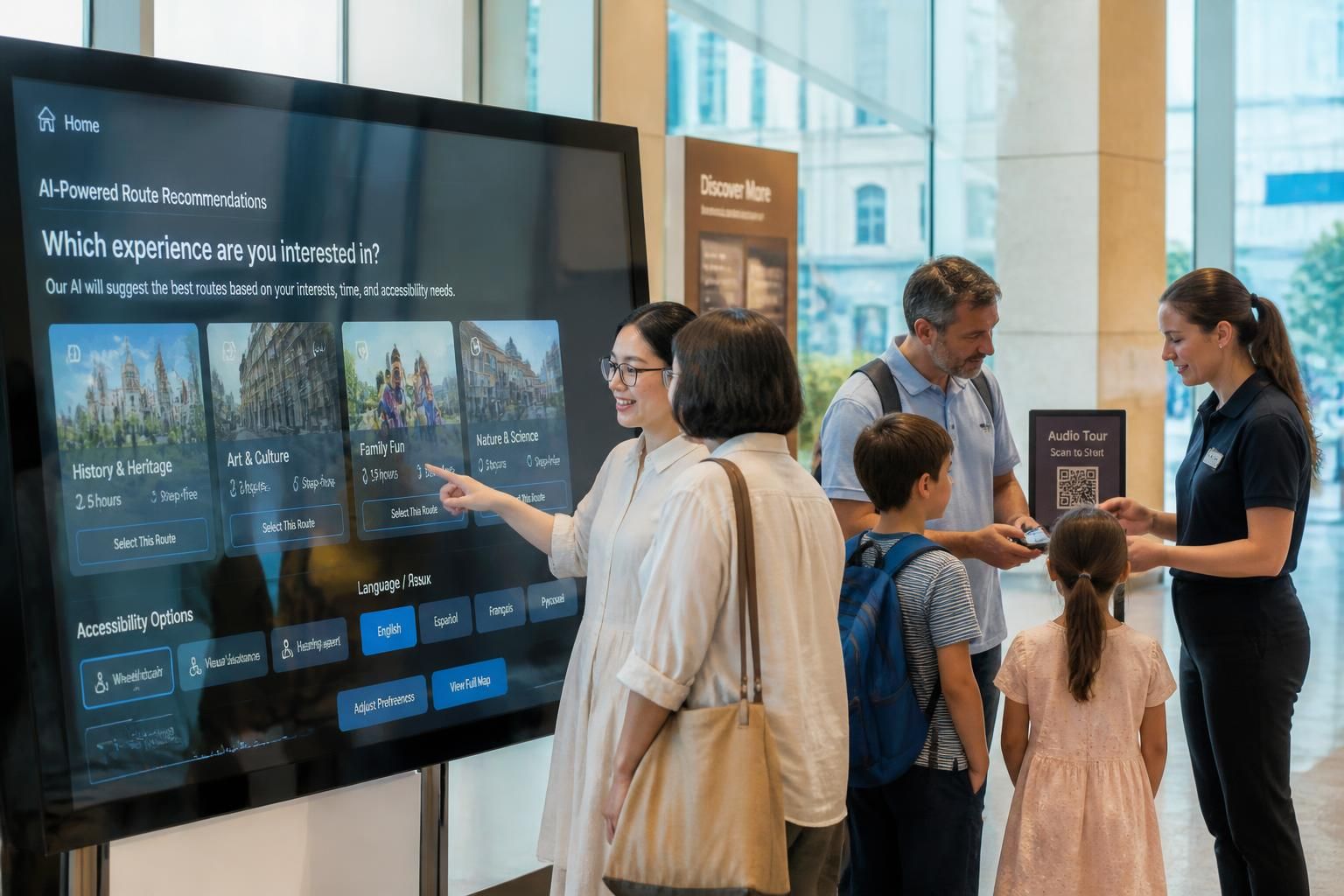
A display at the entrance of a heritage site, for example, may help visitors choose a route based on available time, mobility needs, language, or crowd levels. A display inside a classroom may enable a teacher to bring up visual resources, annotate a map, launch a collaborative exercise, and share a lesson recap with remote learners. The screen itself is not the value: the value lies in reducing friction at the exact moment users need information or interaction. 🎯
From passive signage to responsive interactive interfaces
Traditional digital signage follows a broadcaster model: an organisation prepares content and sends it to a screen. AI-driven systems introduce a more responsive model. They can adjust brightness to the environment, select a language based on an explicit user choice, recommend content according to a programmed itinerary, or alert staff when a display is offline.
That does not mean every screen should attempt to “think” for itself. A museum gallery containing sensitive historical material may need stable, curator-approved content. Conversely, a tourism office serving international visitors may benefit from interactive interfaces that provide live transport notices, accessible routes, local event listings, and QR codes leading to mobile audio guides. The correct level of automation depends on the use case.
Consider a fictional organisation called Harbour Stories, which manages a coastal museum and walking tours. Its first screen, installed near the ticket desk, previously played the same silent video all day. The team replaces it with a simple smart display that offers three buttons: “45-minute visit,” “family route,” and “step-free route.” Each choice opens a practical map, suggests relevant objects, and proposes a QR code to start an audio experience on the visitor’s own phone. The upgrade is modest, but it turns waiting time into useful orientation.
This practical approach aligns with broader digital signage innovation for customer engagement, where context-aware displays are increasingly positioned as connected service points rather than isolated advertising assets. For tourism professionals, the important question is not “What can AI generate?” but “Which step of the visitor journey becomes clearer, faster, or more inclusive?”
Defining measurable value before choosing hardware
Before purchasing a panel, camera, media player, or subscription, teams should identify one primary outcome. A cultural venue may want to lower repeated front-desk questions. A university may want to improve hybrid participation. A hotel may need to communicate service changes consistently across several buildings. These goals require different workflows, content, and success indicators.
| Priority | Smart display application | Useful indicator |
|---|---|---|
| 🧭 Visitor orientation | Interactive route selection and live wayfinding | Fewer directional questions at reception |
| 🎓 Learning participation | Shared annotation, captions, and remote collaboration | Completion of activities and learner feedback |
| 🔊 Guided experiences | Screen-to-mobile audio handoff through QR codes | Audio-guide activations and route completion |
| 🛠️ Operational reliability | Cloud monitoring and scheduled publishing | Reduced screen downtime and faster updates |
A useful pilot does not require a large estate of screens. Harbour Stories could test one entrance display for six weeks, document common visitor choices, interview staff, and review whether the new interaction lowers queues. That evidence will reveal whether the next investment should be a second display, multilingual content, better Wi-Fi, or an improved mobile audio journey.
💡 A smart display becomes genuinely intelligent when it supports a defined decision, not when it merely looks technologically advanced.
Connecting Cloud Technologies to Manage Content Across Every Location
Cloud technologies give distributed display networks a practical advantage: teams can publish, correct, schedule, and monitor content without travelling to each location. This is particularly valuable for tourism networks where an office, landmark, museum, shuttle stop, and event venue may all need coordinated information. A cloud platform can serve as the operational backbone that keeps those touchpoints aligned.
For a city festival, centralised management prevents a familiar problem: one screen promotes a programme that has changed while another shows outdated opening times. With cloud computing, authorised staff can update a timetable once and distribute it to selected displays. A local museum can keep its permanent exhibition content unchanged while the visitor centre receives live messages about weather, capacity, or an unexpected road closure.
Creating a reliable cloud content workflow
The technical model should remain understandable for non-specialist teams. Content creators need an approval path, venue managers need an easy way to request urgent changes, and IT teams need visibility over devices, connectivity, user permissions, and software versions. Without these roles, a cloud dashboard can become another fragmented tool rather than a source of operational consistency.
A sound workflow usually separates content into three categories. First, evergreen material includes maps, safety guidance, accessibility information, and permanent collection highlights. Second, scheduled content covers exhibitions, workshops, seasonal routes, or conference sessions. Third, live information includes delays, room changes, weather alerts, or crowd-management messages. Each category should have an owner and a review date.
Harbour Stories could use a cloud workspace where curators approve historical descriptions, the visitor-services manager updates opening hours, and the tour coordinator publishes daily departure times. The staff would not need to edit the same file manually on several screens. Instead, templates ensure that essential information stays readable on different formats, from a large lobby panel to a smaller reception display.
☁️ The real strength of cloud technologies is not remote access alone; it is the ability to establish one reliable source of truth. This matters when content is distributed across spaces with different staff, schedules, and audiences.
Planning for connectivity, resilience, and offline continuity
Cloud-connected does not mean entirely dependent on a perfect internet connection. A display should retain its last approved playlist if Wi-Fi is interrupted. Critical content, such as evacuation instructions or public safety notices, needs local storage and a clear fallback rule. Organisations should test this scenario deliberately rather than discover it during a busy event.
Network segmentation is equally important. Visitor Wi-Fi, payment systems, staff devices, and display management should not automatically share the same access level. A simple inventory should record every screen’s location, operating system, content player, network method, software status, and responsible owner. This basic discipline makes maintenance far more manageable as the deployment expands.
Cloud platforms are also moving beyond simple scheduling. Current forecasts for AI and video in digital displays point toward systems that combine edge processing, context-aware media, and modular applications. For organisations, this reinforces the need to choose platforms that can integrate with booking tools, learning environments, ticketing systems, or visitor-information feeds without forcing every service into a closed ecosystem.
A small-scale test should therefore include content publishing, device monitoring, an offline test, and a permissions review. It should also measure how long it takes a staff member to make a legitimate urgent update. If a change requires technical intervention for every minor correction, the platform is not yet supporting the daily reality of the venue.
💡 A cloud-managed network should make content governance calmer, not create a faster route to confusion.
Using Artificial Intelligence to Improve Learning, Interpretation, and Accessibility
Artificial intelligence can help organisations create more adaptive and inclusive experiences, especially when smart displays are paired with cloud-based collaboration. Education provides one of the clearest examples. Schools and higher-education institutions are expected to support in-person, remote, and blended learning while maintaining teaching quality, student engagement, and consistent access to materials.
Teachers often face lengthy preparation cycles, disconnected classroom tools, and limited time to turn interaction into usable feedback. Learners expect richer visual material, opportunities to participate, and content they can revisit outside the room. An AI-enabled interactive flat-panel display can address parts of this challenge when it fits a coherent learning workflow rather than functioning as a large digital whiteboard.
Supporting the complete lifecycle before, during, and after an activity
Before a lesson or guided session, a cloud-based assistant can help structure an outline, retrieve approved multimedia resources, and turn a prompt into a draft quiz or discussion activity. Human review remains essential. A teacher, guide, or curator must validate factual accuracy, tone, copyright status, and relevance to the audience before content reaches a screen.
During delivery, voice controls can reduce interruptions. A teacher may ask the panel to open a map, start a timer, or move to the next activity without breaking eye contact with students. In a museum context, a mediator could use the display to enlarge a visual detail, compare two restoration stages, or open a short captioned video when visitors request more context.
Real-time captions and multilingual support are particularly valuable. They can assist visitors who are deaf or hard of hearing, learners working in a second language, and international groups. Captions should not replace well-designed audio, however. A complete experience provides clear sound, readable contrast, logical pacing, and a choice between screen-based information and personal listening devices.
For guided tourism, the display can become an effective starting point for an audio-first experience. Visitors might select their language and scan a code to access a route on their own smartphone. This approach reduces shared-device handling while preserving professional narration. It also allows the guide to add live explanations without forcing every participant to crowd around a single panel.
Practical cultural resources can extend that experience. For example, visitors interested in collection-led travel may discover perspectives around the world’s largest Apple collection, while a museum team may reflect on the operational impact of the rise of mega museums. These examples underline that digital mediation should help audiences navigate scale and complexity, not add another layer of distraction.
Turning interaction into responsible follow-up
After a session, machine learning tools can assist with routine tasks such as producing a structured recap, collecting shared notes, creating draft assignments, or identifying questions that caused difficulty. In an education setting, this may reduce administrative workload and give students a clearer revision resource. In tourism, it may help staff understand which routes or themes produce the most requests for additional information.
Automation should remain transparent. A teacher should be able to edit an AI-generated summary before publication. A cultural institution should avoid presenting generated interpretation as verified scholarship. The same rule applies to translation: it can accelerate access, but material concerning history, identity, religion, or contested heritage requires review by informed humans.
Harbour Stories could run a school workshop on coastal archaeology. Students use the panel to label a digital excavation image, while remote classmates participate through shared annotations. At the end, the platform generates a draft list of key terms and activities. The teacher checks the material, adds the required local context, and shares it through the learning platform. 🎓 The outcome is not “AI teaching”; it is a better-supported educator with more time for explanation and discussion.
Applying Data Analytics Without Compromising Trust and Privacy
Data analytics can help organisations understand whether smart displays are actually useful. Yet measurement must begin with restraint. The most meaningful information is often operational: which language button is selected, which route is opened, how often a QR code is scanned, whether a display has failed, or which content needs a clearer call to action.
These signals can improve service design without identifying individuals. A tourism office may learn that the accessible route is selected frequently in the morning but is difficult to find on the mobile map. A university may see that students replay one visual explanation after class. A transport venue may find that a disruption message is viewed but that visitors still approach staff with the same question, indicating that the wording needs revision.
Choosing useful metrics rather than collecting everything
AI-driven systems can produce a large volume of information. That does not make all of it valuable. Teams should connect each data point to a service decision: what will change if the metric rises, falls, or remains stable? If there is no credible answer, the data may not need to be collected.
| Measurement area | Low-risk example | Operational decision |
|---|---|---|
| 📍 Navigation | Number of route selections by language | Improve translated maps and route signage |
| 📱 Mobile handoff | QR code activation rate | Adjust placement, instructions, or audio offer |
| 🖥️ Display performance | Offline duration and device alerts | Prioritise maintenance and connectivity fixes |
| 🧩 Content understanding | Repeated requests for a topic | Clarify wording or add an explanatory asset |
Computer vision, facial analysis, and audience estimation require special caution. In many public-facing contexts, collecting or processing biometric information may trigger legal obligations and undermine visitor confidence. A venue should never use cameras simply because the hardware offers the capability. It must establish a lawful purpose, explain the practice clearly, limit retention, and consider whether anonymous alternatives can achieve the same service goal.
For most cultural and educational projects, anonymous interaction logs are enough. A touch screen can record that a visitor chose “family route” without storing who that visitor is. An audio-guide platform can report aggregate completion levels without exposing an individual’s identity. This creates a more proportionate balance between insight and privacy.
Using insights to improve the experience in small cycles
Harbour Stories may find that 70% of users selecting the “45-minute visit” route also open the maritime-trade audio stop. Rather than immediately creating highly personalised profiles, the team can improve the route with clearer visual direction and add a short optional audio introduction. It can then compare activation and completion trends over the next month.
This iterative process is more reliable than treating analytics as a one-time report. Observe a pattern, form a hypothesis, make one controlled change, and review the outcome. Staff feedback must remain part of the process because numerical signals rarely explain frustration, confusion, or delight on their own.
The rapid growth of AI-generated media also requires content verification. Cultural and public institutions should have a process for checking source material, particularly when synthetic voice, visual reconstruction, or generated translations are involved. Discussions around fake AI video risks demonstrate why audience trust depends on clear provenance and careful editorial oversight.
🔐 Responsible data analytics improves a service while protecting the confidence that makes people willing to use it.
Maximizing Potential Through Practical Deployment and Staff Adoption
Maximizing potential from smart displays and cloud technologies is primarily an organisational task. Hardware can be installed quickly; dependable use depends on staff confidence, content routines, technical support, and realistic scope. The strongest deployments start with one journey, one team, and one measurable service improvement before they expand.
A museum, destination-management organisation, or education provider should map the real environment first. Where do users hesitate? Which questions are repeated? What information changes often? Which groups need a more accessible alternative? This observation phase frequently exposes straightforward problems that technology can address, such as unclear route signage, inconsistent event information, or difficult-to-hear group explanations.
Running a pilot that staff can sustain
A practical pilot should last long enough to reveal operational habits, usually through a full cycle of busy and quieter periods. It needs a named owner, a content calendar, a support contact, and a process for collecting staff observations. If the screen is installed without these foundations, it risks becoming an expensive static poster.
- 🧭 Define one service problem, such as reducing orientation questions at the entrance.
- 👥 Identify the main audience, including language, mobility, hearing, and digital-access needs.
- 📝 Create approved content templates with clear reading hierarchy and plain language.
- ☁️ Configure cloud permissions so routine changes do not depend on one technical person.
- 📊 Measure a small set of agreed indicators and review them with frontline staff.
- 🔄 Improve one element at a time before extending the model to other locations.
Training should focus on real tasks, not feature demonstrations. Reception staff need to know how to restart a display, report a problem, and direct visitors to the appropriate interaction. Curators need to understand what content format works at a distance. Guides need a seamless way to connect a display moment to a smartphone audio experience. Managers need a concise report showing whether the system reduces workload or improves access.
For example, Harbour Stories could prepare a “morning opening” checklist: confirm the screen is online, review live transport content, test the QR audio link, and verify that the accessible route remains available. This takes minutes, yet it prevents the common failure of discovering a broken visitor touchpoint only after complaints emerge.
Keeping technology aligned with human service
There is a temptation to treat every innovation as a reason to redesign the entire experience. That approach can exhaust teams and confuse audiences. A display should complement staff knowledge, printed essentials, physical wayfinding, and human conversation. Visitors who prefer personal assistance must still be able to receive it.
Likewise, audio remains important in spaces where people are walking, looking outward, or unable to remain beside a screen. A well-designed mobile audio guide can continue the experience beyond the display, support several languages, and provide a more personal pace. The most effective digital transformation connects these channels rather than forcing users into a single interface.
Technology suppliers are also increasingly presenting connected ecosystems that combine panels, conferencing tools, AI functions, and management platforms. Reports on AI-driven display innovations for work and education illustrate this shift toward integrated environments. Buyers should still examine interoperability, accessibility features, service commitments, data handling, and the ability to export their content and reporting data.
🚀 The most sustainable smart-display programme is one that staff can operate confidently on an ordinary busy day.
What is the first step when deploying AI-driven smart displays?
Start with one clearly observed user problem, such as visitor orientation, multilingual access, or hybrid classroom participation. Define a simple success measure before selecting hardware or software.
How can cloud technologies help museums and tourism organisations?
They allow approved teams to update content remotely, schedule information across several locations, monitor device status, and keep visitor communications consistent during changing conditions.
Do smart displays need cameras or facial recognition to be useful?
No. Many effective uses rely on anonymous touch interactions, QR activations, content scheduling, accessibility features, and device monitoring. Biometric processing should only be considered where there is a clear lawful and proportionate purpose.
How does artificial intelligence improve accessibility?
It can support live captions, translation drafts, voice controls, content summaries, and adaptive routes. These functions require human review and should complement clear visual design, quality audio, and accessible physical navigation.
