
LigoLab’s AI-Powered Voice Interface Moves Beyond Speech-to-Text
LigoLab’s October 9, 2026 announcement describes a practical change in how laboratory professionals interact with their information system: spoken instructions can support both documentation and designated workflow actions. The product, LigoLab Voice, is integrated into the company’s anatomic pathology laboratory information system rather than presented as a standalone transcription application.
That distinction matters because accurate transcription solves only part of the usability problem. A specialist may dictate a specimen description successfully, then still need to reach for a mouse, select another screen, locate an ordering function, and confirm the next step.
The proposed benefit is less switching between clinical work and software controls. The announcement describes four interaction types: dictating observations, navigating supported workflows, requesting stains, and receiving spoken responses. These capabilities extend conventional speech-to-text toward what the company calls speech-to-action.
How LigoLab Voice Connects Spoken Instructions to Supported Actions
Consider a hypothetical laboratory, Northbridge Pathology, used throughout this article to illustrate implementation decisions. Its team already records findings electronically, but staff repeatedly interrupt specimen examination or slide review to operate the laboratory information system, commonly abbreviated as LIS.
With a voice-enabled interface, a pathologist could dictate a finding and initiate a supported stain request within the relevant case workflow. Spoken feedback would then confirm the supported action, reducing the need to inspect a separate control immediately after every instruction.
This example is illustrative, not a reported customer result. The company’s overview of hands-free pathology workflows describes the intended capabilities, but laboratories should establish which commands are available in their own configuration before changing working practices.
- 🎙️ Dictate: Capture specimen descriptions, observations, and diagnostic findings in applicable reporting fields.
- 🧭 Navigate: Move through supported screens, cases, specimens, and workflow functions.
- 🧪 Order: Request stains within designated pathology case workflows.
- 🔊 Listen: Receive spoken feedback about supported actions and their status.
These functions should not be interpreted as unrestricted conversational control over every feature. The source material repeatedly refers to supported actions, which makes command coverage, permissions, and workflow context essential questions for any demonstration.
Why Workflow Context Matters More Than a Natural-Sounding Response
A general transcription tool can capture the words “request an additional stain” without creating an order. An integrated interface must connect the request to an authorized function and the appropriate laboratory record; otherwise, fluent recognition produces text without advancing the work.
At Northbridge, the evaluation team would therefore examine what happens before and after an instruction. Which case is active? Which specimen receives the request? Does the system distinguish a statement being dictated from an instruction intended to trigger an action?
The announcement does not provide detailed answers about command interpretation, confirmation rules, or recognition performance. Those subjects belong in a product demonstration and local validation exercise, not in assumptions based on the phrase AI-powered voice interface.
The broader shift resembles other voice-enabled business applications, including the themes explored in Grupem’s coverage of voice interaction in CRM workflows. The useful comparison is interaction design: speech becomes valuable when it connects reliably to a defined task, not merely when the system sounds conversational.
The first evaluation question is therefore operational: does a spoken instruction complete the intended, authorized step in the correct context? Answering it requires attention to the physical environment where staff will actually speak.
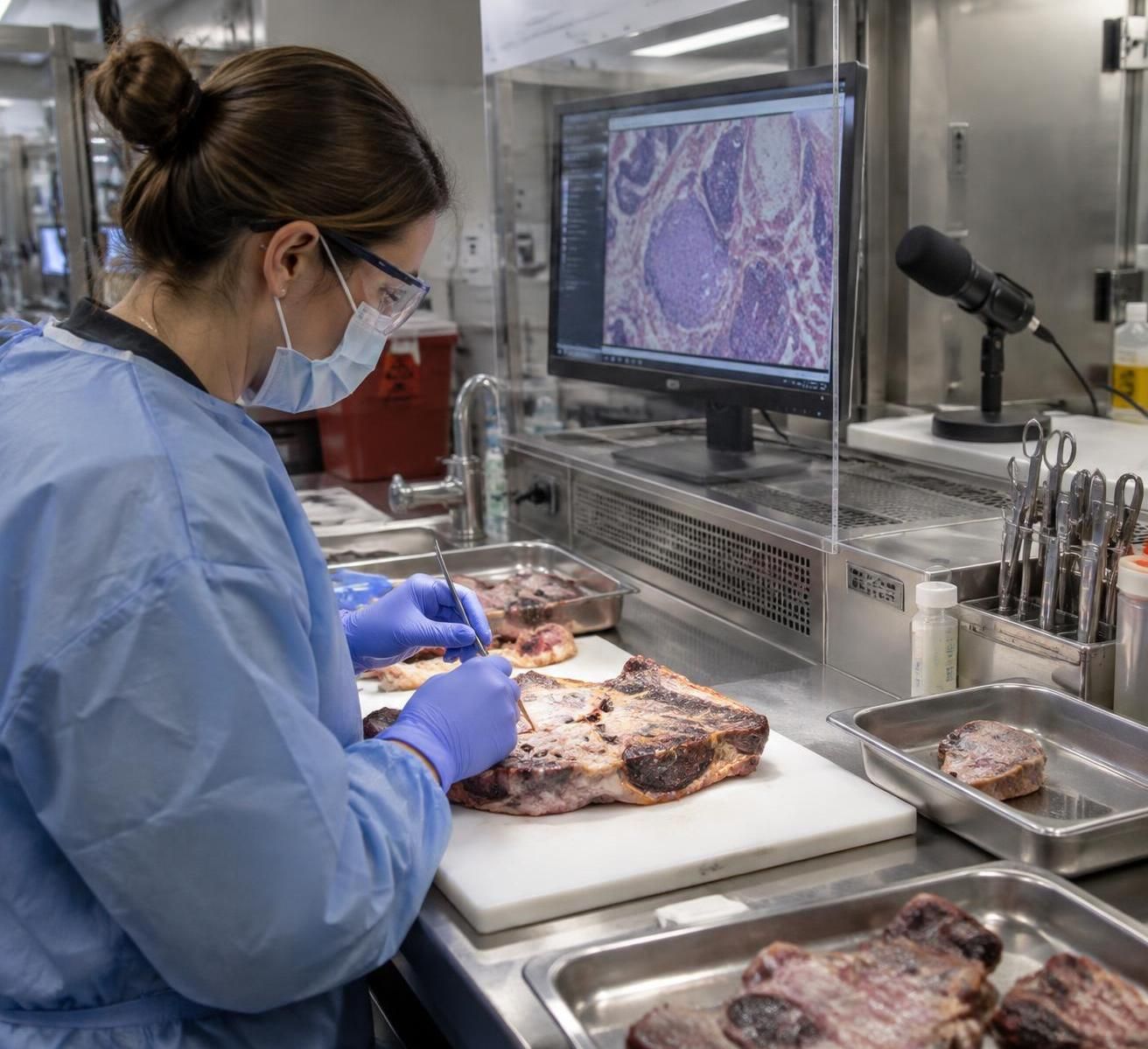
Hands-Free Anatomic Pathology Workflows Start with Reliable Audio
The grossing station is one of the clearest use cases for voice interaction because staff examine and process specimens while their hands are occupied. Repeatedly switching to a keyboard or mouse can interrupt that sequence, particularly when descriptions must be recorded alongside physical observations.
The supplied announcement identifies pathologists’ assistants and grossing technologists among the intended users. It also states that the interface builds on capabilities already embedded in environments such as Grossing Touchscreen, connecting the new interaction layer to existing laboratory processes.
However, hands-free operation depends on more than recognizing a command in a quiet demonstration. Microphone placement, ventilation noise, protective equipment, nearby conversations, and room acoustics can all affect the quality of the signal reaching a speech system.
Test Voice Recognition at the Grossing Station, Not Only in a Meeting Room
At the hypothetical Northbridge laboratory, a pilot would begin at one representative station during normal working conditions. Staff would use approved test records and realistic vocabulary while the evaluation team observes whether dictation remains usable when extraction equipment and neighboring activity are present.
The purpose is not to manufacture a difficult acoustic challenge. It is to identify whether everyday sound changes the number of corrections, repetitions, or manual interventions required to complete routine documentation.
A microphone placed close enough to capture the speaker clearly may improve signal quality, but equipment selection must also respect local safety and infection-control procedures. Any device near specimen handling should be assessed for cleaning, positioning, compatibility, and interference with protective equipment.
For example, a headset may follow a user’s movement consistently but create practical issues during changes of protective clothing. A fixed microphone may simplify equipment handling while becoming less effective when a worker turns away to inspect material.
Neither arrangement should be treated as universally superior. The appropriate setup is the one that performs reliably within the station’s actual constraints, including the laboratory’s approved hygiene practices and the user’s normal range of movement.
Make Spoken Feedback Clear Without Adding Acoustic Clutter
Two-way audio introduces a second design problem: the system must be heard without distracting everyone nearby. If multiple workstations announce actions simultaneously, staff may struggle to determine which response belongs to which task.
Northbridge could evaluate personal audio delivery where appropriate, or carefully positioned playback equipment where headsets are unsuitable. Those are implementation options to discuss with the supplier and local teams, not features established by the announcement.
Feedback also needs to communicate meaningful status. A response indicating that an instruction was recognized is different from confirmation that an order was accepted; confusing those states could cause a user to continue before the intended task is complete.
A useful test scenario would deliberately include an unsupported request. Evaluators would observe whether the response clearly explains that no action occurred and whether staff can return to manual controls without losing their place.
- 🎧 Test audio capture with normal ventilation and neighboring activity.
- 🧤 Check equipment positioning against local protective-equipment and cleaning rules.
- 🔊 Assess whether confirmations remain intelligible without disturbing adjacent users.
- ⌨️ Keep an accessible manual fallback for recognition failures or unsupported tasks.
Accessible design also means accommodating different accents, speech patterns, hearing needs, and preferences. The release provides no subgroup performance measurements, so a representative staff pilot is more informative than assuming uniform results across all users.
Laboratory efficiency begins with dependable audio, but its value ultimately depends on whether the captured information remains correct and usable in the clinical record. That makes reporting quality the next critical test.
Protect Pathology Reporting Quality While Reducing Manual Interaction
Pathology reporting requires more than a readable transcript. Findings must remain associated with the correct case, fit the intended reporting field, preserve clinical meaning, and pass through the laboratory’s established review and authorization processes.
The announcement positions the voice capability within a wider platform supporting accessioning, specimen tracking, testing, diagnosis, reporting, and sign-out. It also describes existing functions such as diagnostic macros, CAP synoptic templates, historical-result correlation, and amendment management.
Those platform capabilities are not evidence that every function is voice-controlled. The practical distinction is between the broader LIS feature set and the specific actions currently supported through spoken interaction.
Separate Clinical Documentation from Commands That Change the Workflow
Imagine a Northbridge pathologist reviewing slides and describing a possible next step within a dictated note. A phrase such as “consider an additional stain” communicates an observation or plan; it should not automatically be treated as an instruction to create an order.
Conversely, an intentional request needs a predictable route to the appropriate ordering function. The pilot should therefore test how users distinguish narrative language from executable commands and how the application handles ambiguous wording.
This is a human-interface issue as much as a recognition issue. Users need a clear mental model of when they are entering text, when they are navigating, and when they are asking the software to perform an action.
A similar distinction appears in discussions of voice-assisted note-taking tools: recording spoken information and acting on that information are separate capabilities. In a clinical environment, keeping that boundary understandable is especially important because an unintended action can affect downstream work.
| Interaction | Illustrative task | Validation priority |
|---|---|---|
| 🎙️ Dictation | Record a specimen description | Correct terminology, measurements, negation, and destination field |
| 🧭 Navigation | Move to a supported case view | Visible confirmation of the active record and specimen |
| 🧪 Stain request | Initiate a supported order | Correct selection, case association, permissions, and status |
| 🔊 Spoken response | Confirm a requested action | Clear distinction between recognition, acceptance, and completion |
Keep Professional Review Central to Voice-Assisted Documentation
Recognized text still requires review. Measurements, anatomical terms, abbreviations, and negative findings deserve particular attention because a small transcription change can alter meaning even when the surrounding paragraph appears fluent.
Northbridge could build a validation set from approved, de-identified examples containing realistic terminology and deliberately challenging phrases. Staff would compare the resulting entries with the intended wording and record the corrections needed before the text was acceptable.
The objective would be practical quality assurance, not an impressive recognition percentage detached from use. A system that transcribes most words correctly may still create unacceptable rework if its errors concentrate in clinically significant terms.
The same principle applies to macros and structured templates. Existing shortcuts can reduce repetitive entry, but evaluators should verify whether a spoken interaction places information correctly and preserves the required structure rather than assuming integration guarantees accuracy.
For digital pathology teams, voice may complement image review by reducing trips between the viewing environment and manual controls. The announcement does not establish autonomous image interpretation or diagnostic decision-making, and those functions should not be inferred from the AI label.
Local sign-out policies should remain unchanged unless the laboratory deliberately revises them through appropriate governance. Voice-assisted clinical documentation is an alternative input method, not a substitute for professional responsibility, accurate case association, or final review.
Once those boundaries are clear, decisionmakers can assess the less visible requirements: access controls, data handling, traceability, and the consequences of failed or disputed actions.
Evaluate LigoLab Voice Governance Before Expanding Workflow Automation
An integrated voice interface affects how staff interact with sensitive records and how instructions enter operational workflows. Procurement should therefore examine information governance alongside usability, rather than treating audio as an ordinary peripheral added after the main software decision.
LigoLab, founded in 2006 and based in Glendale, California, develops a unified platform covering laboratory information systems, revenue cycle management, automation, business intelligence, patient engagement, and reporting. That breadth provides context for the product, but does not answer specific security questions about its speech-processing architecture.
The supplied announcement does not specify whether audio processing is local or remote, whether recordings are retained, or whether external processors are involved. These are questions for contractual documentation and technical review, not facts that can be assumed from platform integration.
Ask Where Audio Goes and How Spoken Actions Are Recorded
Northbridge’s informatics team would start by mapping the information flow. Does the workstation transmit audio, recognized text, or both? Which infrastructure receives that information, and which contractual terms govern its handling?
Where remote processing is involved, the laboratory should establish the applicable privacy obligations, service-provider responsibilities, and any required agreements. Where processing is local, administrators still need to understand device security, temporary files, and access to stored information.
Retention deserves its own question. Keeping recordings may support certain troubleshooting activities, but it also creates another category of sensitive material that requires a defined purpose, access policy, and deletion schedule.
Auditability is equally important when speech triggers an operational change. The laboratory should determine whether available records identify the user, affected case, requested operation, resulting status, and relevant time, using the platform’s actual logging capabilities.
Suppose a staff member believes a stain request succeeded, but the laboratory cannot find the expected order. Troubleshooting should distinguish a recognition failure from a rejected request, an incorrect case context, or an interruption before completion.
Without that distinction, teams may repeat an action unnecessarily or investigate the wrong part of the process. Traceability makes errors diagnosable; spoken reassurance alone does not.
Keep Authorization and High-Impact Actions Explicit
A new input channel should not bypass existing access restrictions. Evaluators should confirm that requests are governed by the authenticated user’s permissions and that an unauthorized operation cannot succeed simply because it was spoken.
Shared workstations require particular care because the person speaking may not be the person whose account remains active. Session management, workstation locking, and local authentication practices should be assessed before treating speech as a dependable instruction source.
The product announcement does not establish speaker identification or voice-based authentication. Laboratories should not confuse recognition of words with verification of the speaker’s identity, even when the interaction feels personal or conversational.
Higher-impact functions also deserve stronger evaluation than low-risk navigation. An organization might begin with dictation and limited screen movement, then expand to supported ordering after staff demonstrate reliable use and the required safeguards are confirmed.
That staged approach is a deployment recommendation, not a description of default product settings. The relevant controls, confirmation options, and supported command boundaries should be reviewed directly with the vendor.
The LigoLab Voice webinar page provides a useful route toward a workflow demonstration. Decisionmakers should accompany that demonstration with a written requirements list covering security, permissions, failure recovery, and evidence of completed actions.
Workflow automation earns trust when staff can explain who authorized an action, what happened, and how to recover when it did not happen as intended. With that foundation, a pilot can measure operational value rather than merely showcase novelty.
Measure Laboratory Efficiency with a Controlled LigoLab Voice Pilot
The announcement explains intended benefits but does not provide independently validated productivity measurements. It reports no quantified reduction in turnaround time, documentation errors, or manual interactions, so laboratories should establish their own baseline before attaching financial expectations to deployment.
A useful pilot measures the complete task, including correction and recovery time. Counting only the seconds spent speaking can exaggerate value if users must later repair text, locate a misplaced entry, or verify whether an instruction actually succeeded.
At Northbridge, the first pilot could involve one grossing station and a small group of pathologists using agreed workflows. The team would choose representative tasks, approved test material, and a clearly defined observation period rather than opening every available function immediately.
Compare Equivalent Tasks, Not Unequal Workloads
The manual baseline should include the same kinds of cases and actions examined during the voice trial. Comparing straightforward specimens in one group with unusually complex work in another would make the results difficult to interpret.
Staff experience also matters. A frequent user of existing keyboard shortcuts may initially work faster with manual controls than a new voice interface, while another colleague may adapt quickly because dictation already forms part of their routine.
Allowing a familiarization period helps separate training effects from sustained performance. Results should then be reviewed by role and workstation rather than reduced immediately to a single average that hides important differences.
- ⏱️ Task completion time: Measure documentation or ordering from start to verified completion.
- ⌨️ Manual interventions: Count keyboard and mouse actions still needed during supported tasks.
- 📝 Correction burden: Record edits, repeated instructions, and time spent resolving them.
- 🧪 Order integrity: Check correct case association, intended selection, and absence of unintended duplication.
- 🔄 Recovery effort: Observe how staff resume work after failed or unsupported requests.
- 👂 User experience: Assess concentration, acoustic comfort, accessibility, and perceived workload.
These measures reveal trade-offs that a demonstration may miss. For example, fewer mouse movements would be encouraging, but not sufficient if spoken feedback distracts neighboring staff or if correction work shifts to another team.
Turnaround time requires even more caution because it reflects processing, staffing, testing schedules, case complexity, and other dependencies. Improvements in one workstation interaction do not automatically translate into faster final reporting across the laboratory.
Define Expansion Criteria Before the First Live Trial
Northbridge’s leadership should agree in advance what would justify broader deployment. Criteria might include acceptable documentation quality, reliable case association, manageable training effort, and a measurable reduction in interruptions without new safety concerns.
Those thresholds should reflect local needs rather than an invented industry benchmark. A high-volume grossing environment may prioritize uninterrupted specimen description, while a specialist service may value precise navigation between complex records more strongly.
Costs should include equipment, licensing, configuration, support, training, and ongoing validation where applicable. Procurement should confirm the actual commercial terms instead of assuming that a feature integrated into an existing platform carries no additional implementation expense.
Interoperability questions should remain equally concrete. Laboratories using digital pathology viewers or other connected applications need to establish where supported voice interaction begins and ends; integration with the LIS does not imply universal control of external software.
The supplier’s laboratory informatics resources can help teams frame discussions around their existing configuration. A productive demonstration uses the organization’s proposed tasks and terminology, then shows successful actions, rejected requests, and recovery paths rather than only an ideal sequence.
Expansion can proceed role by role after the evidence supports it, with training updated around observed difficulties. The deployment decision should follow verified task performance: fewer interruptions are valuable only when documentation quality, accountability, and practical usability remain intact.
What is LigoLab Voice?
LigoLab Voice is an AI-assisted interface integrated into LigoLab’s anatomic pathology LIS. The announcement describes dictation, navigation through supported workflows, voice-driven stain requests, and spoken feedback confirming supported actions.
How does it differ from conventional speech-to-text?
Conventional speech-to-text primarily converts spoken language into written text. This interface also supports designated workflow actions, connecting spoken instructions to functions within the laboratory information system. Exact command coverage should be confirmed for the laboratory’s configuration.
Does the interface make diagnostic decisions?
The supplied announcement describes documentation and workflow control, not autonomous diagnosis or image interpretation. Pathologists remain responsible for reviewing findings, ensuring accurate reporting, and following established authorization procedures.
Which laboratory professionals are intended users?
The described use cases include pathologists at their workstations and pathologists’ assistants or grossing technologists at grossing stations. Suitability depends on the supported workflow, local audio conditions, permissions, and individual accessibility needs.
What should a laboratory verify before adoption?
Verify supported commands, recognition performance under normal working conditions, case association, confirmation behavior, permissions, data handling, audit records, and manual fallback. A controlled pilot should measure complete task time and correction effort rather than relying on unquantified efficiency claims.
