
Short on time? Here is what matters:
- 🎙️ A Voice-Activated AI study partner can make spelling and arithmetic practice more conversational, but it needs clear boundaries.
- 🧮 The strongest result is not automated homework: it is repeated, patient practice that helps children explain their reasoning.
- 📅 Artificial Intelligence can also reduce family admin by turning paper notices into calendar-ready tasks, provided every date is checked by an adult.
- 🛡️ Adult presence, age-appropriate prompts, and privacy-aware settings remain essential for safe Kids Learning.
Building a Voice-Activated AI Tutor Around Real Schoolwork
The practical starting point for an AI Tutor is not a generic request for “homework help.” It is a specific learning need visible in a child’s weekly work, classroom study sheet, or progress report. In the case behind this experience, a California parent noticed that his two daughters, aged eight and six, were not failing, yet each was slightly behind expected classroom benchmarks in a different area: one in math and the other in reading-related work.
That distinction matters. A useful educational tool should not treat every child as having the same problem. One learner may need to rehearse number facts and understand a multi-sensory method such as TouchMath. Another may need more deliberate Spelling Assistance: hearing a word, breaking it into sounds, identifying a difficult letter pattern, and using it in a sentence. The adult’s role is to identify the target before opening a voice interface.
The parent used images of school handouts and study guides as the source material. Rather than asking a chatbot to invent a curriculum, he instructed it to work from the content the children were already expected to learn. This is an important design choice. It keeps the session aligned with the teacher’s vocabulary, test format, and current level, rather than replacing classroom instruction with unrelated exercises.
Clear instructions turn a chat tool into a structured learning assistant
A Voice Recognition interface is engaging because children can answer naturally instead of typing. Yet natural conversation alone is not enough. Without a carefully written instruction, a child may quickly move from multiplication to a favourite film, a game, or an unrelated character. That happened during early tests, when the children began discussing “KPop Demon Hunters” within minutes. The system was revised, not because conversation is undesirable, but because attention needs a gentle route back to the learning goal.
A stronger setup asks the assistant to act like a patient elementary-school tutor: review the supplied material, ask one question at a time, vary the wording, revisit missed answers later, and keep the conversation focused even when distractions appear. It should acknowledge an off-topic comment briefly, perhaps connecting it to the task, then return to the next question. This creates a better balance between warmth and structure.
- 📷 Photograph the current spelling list, maths worksheet, or review page clearly.
- 🎯 State the grade level, the upcoming test type, and the exact skill to practise.
- 🗣️ Ask the assistant to use short questions and wait for a spoken answer.
- 🔁 Require it to explain mistakes in more than one way, then return to that skill later.
- 👩👧 Stay within hearing distance to confirm that explanations remain accurate and suitable.
This approach resembles the workflow used in professional audio experiences. A guided museum visit also depends on a clear route, concise prompts, and timely pauses rather than an endless stream of information. The same principle applies to Interactive Learning: a child needs a visible next step, not an impressive but unfocused conversation.
For families comparing tools, platforms built specifically around spoken lessons can provide useful reference points. For example, voice-based tutoring agents illustrate how natural dialogue can be used to teach different subjects while maintaining a defined educational purpose. The best choice, however, is the one that lets an adult set the scope and review the interaction.
Key insight: an effective voice tutor starts with the teacher’s actual materials, a narrow objective, and an adult who remains responsible for the learning plan.
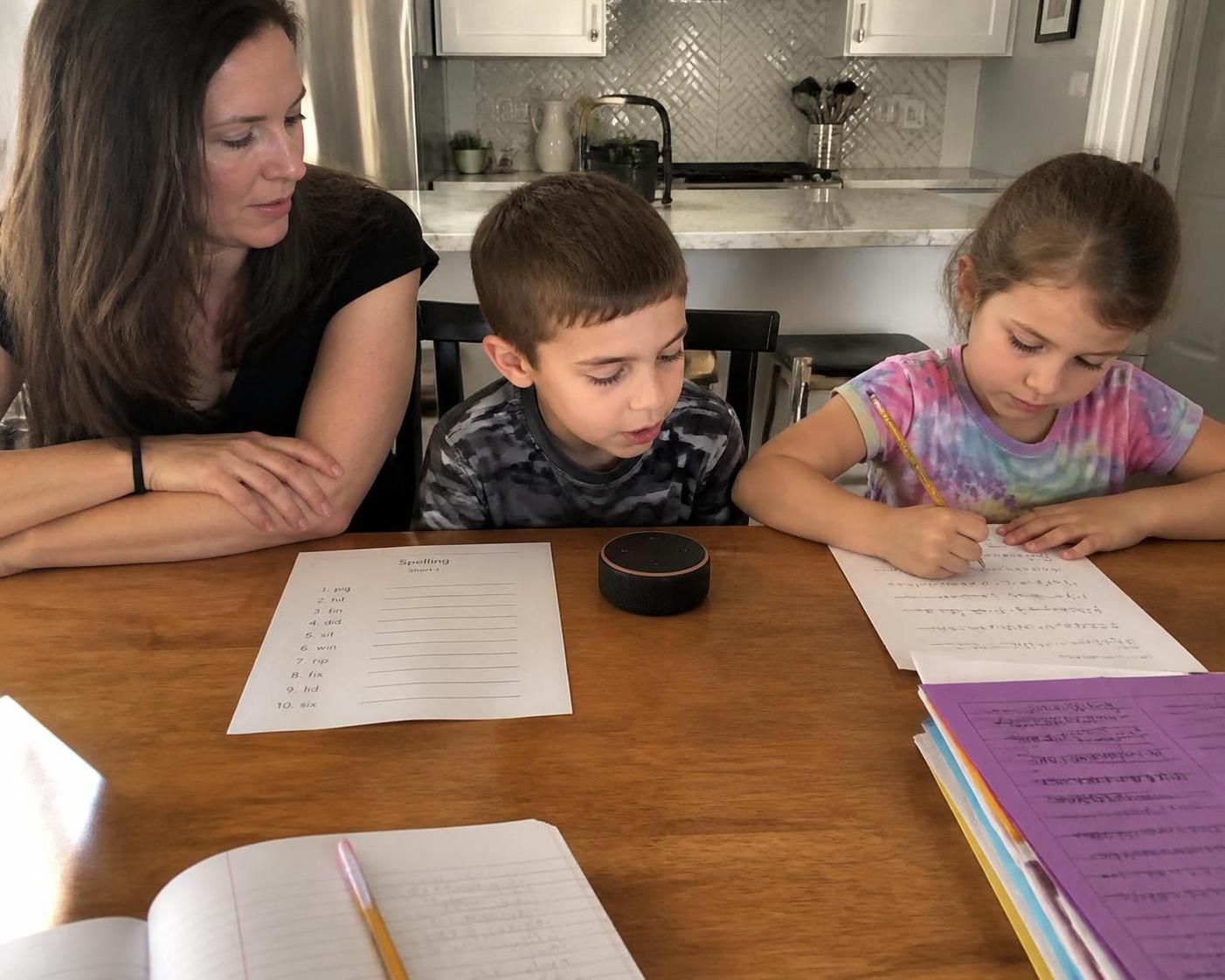
How Voice-Based Spelling Assistance and Math Help Changed Study Sessions
The most useful change was not that a machine provided answers faster. It was that practice became less repetitive for the adult and less adversarial for the children. Weekly spelling and math tests often create a familiar pattern: a parent reads from a list, a child guesses, corrections become rushed, and both sides lose patience. A well-configured AI Tutor can absorb part of that repetition while keeping the adult available for observation and encouragement.
For spelling, the voice format is particularly practical. A tutor can say a word, use it in context, ask the child to repeat it, request the first sound or a difficult letter cluster, and then invite the child to spell it aloud. If the learner says “because” incorrectly, the system can divide the word into memorable parts or offer a new sentence. That is more active than simply showing the answer on a screen.
For Math Help, the assistant should focus on process rather than speed alone. If a child can immediately say that nine plus three equals twelve, that fact may be ready for a test. If the child pauses or guesses, the assistant can ask what strategy would help: counting on, using a number line, grouping objects, or applying the classroom’s stated method. The explanation must match what the school teaches rather than introduce a conflicting shortcut.
| Learning moment | Useful voice prompt | Adult check | Expected benefit |
|---|---|---|---|
| 📝 Spelling recall | “Say the word, use it in a sentence, then ask for each letter.” | Confirm pronunciation and the school list. | 🎯 Better auditory recall and context. |
| ➕ Number facts | “Ask one problem, then ask how the child knows.” | Listen for guessing versus reasoning. | 🧠 Stronger conceptual understanding. |
| 🔄 Missed question | “Explain with another example and revisit later.” | Ensure the correction is accurate. | 📈 Practice without shame or pressure. |
| ✅ Test readiness | “Mix familiar and difficult questions in a short quiz.” | Stop before fatigue takes over. | ⏱️ Realistic confidence check. |
The reported outcome was encouraging: the children’s school reports moved from slightly below satisfactory to above satisfactory. Grades are only one signal, and they should not be presented as proof that technology alone caused the change. Children also received more targeted practice, their parent paid closer attention to weak areas, and the routine was repeated consistently. Still, the reduction in study-time friction is a meaningful result in its own right.
Patience is one of the clearest strengths of Artificial Intelligence in this setting. A voice system can explain a concept six times without sounding irritated. For a child who feels embarrassed by repeated errors, that can preserve motivation. It does not remove the need for human reassurance; it gives the adult more space to provide reassurance instead of reading every question from a page.
Educational products are increasingly judged by whether they teach the route to an answer, not only the answer itself. A recent discussion of an AI tutor focused on learning the process reflects this important standard. For primary education, “Why do you think that?” is often more valuable than “Correct.”
Key insight: the most productive sessions use spoken interaction to reveal a child’s reasoning, allowing errors to become useful teaching moments rather than quick corrections.
Designing Safe Interactive Learning Without Letting the Conversation Drift
Children are naturally curious, and that curiosity should not be treated as a technical fault. It does mean that any Voice-Activated AI used for schoolwork needs practical guardrails. The aim is not to make a child speak like an adult or complete a perfectly linear lesson. The aim is to create a predictable interaction where playful moments do not erase the original learning objective.
A helpful instruction can tell the system to respond politely when the child changes the topic, express brief interest, and then reconnect the comment to the subject. If a learner starts describing a favourite fictional character during spelling practice, the assistant might say, “That character sounds interesting. Let’s use the next spelling word in a sentence about their adventure.” It recognises the child’s contribution without allowing the session to become a general entertainment chat.
Guardrails should protect attention, privacy, and educational accuracy
The first safeguard is adult supervision. In the reported household, the parent stayed present to hear both sides of the exchange. This enabled immediate intervention if an explanation was incorrect or unsuitable. That level of involvement is especially important for younger children, whose confidence can make a fluent response sound more trustworthy than it is.
The second safeguard is limited access. A child does not need unrestricted access to a general-purpose assistant in order to practise five spelling words or a ten-minute set of additions. Families can keep sessions short, use a shared device in a visible room, and open the tool only with an adult. This reduces accidental exposure to unsuitable content and establishes that the tutor is a learning aid, not a private companion.
The third safeguard is data discipline. School worksheets may contain a child’s name, teacher information, school address, or class-specific details. Before uploading images, cover unnecessary personal data where possible. Review the provider’s account settings, voice-data policies, and sharing controls. The convenience of document scanning should never outweigh a family’s right to control sensitive information.
- 🛡️ Use a shared family account rather than an unsupervised child profile where appropriate.
- ⏲️ Set a simple session boundary, such as ten to fifteen minutes per subject.
- 📚 Ask for hints and explanations before asking for final answers.
- 🔍 Compare every unfamiliar method with the child’s classroom materials.
- 🗨️ Teach children to say, “I do not understand; can you explain it differently?”
- 👨👩👧 Review uploads and remove identifying details from photographed documents.
Accessibility deserves equal attention. Spoken interfaces can reduce barriers for learners who find typing difficult, who need repeated auditory instructions, or who benefit from a slower pace. However, voice should not become the only format. Some children need to see a word, write it by hand, or manipulate counters to understand a number. Strong Kids Learning environments combine listening, speaking, reading, and physical practice.
This is where experience from audio technology is relevant. A clear voice experience depends on turn-taking, audible feedback, and a low-friction interface. The same foundations are explored in practical work on voice AI orchestration, where the quality of a spoken interaction depends on how carefully listening, response timing, and task flow are managed. For family use, the lesson is simple: technology should feel calm and understandable, not performative.
Key insight: safety is not a single filter or setting; it is the combined result of supervision, focused prompts, modest session length, and deliberate handling of personal information.
Using Artificial Intelligence to Organize School Notices and Family Routines
The voice tutor was only one part of the family workflow. Another high-value use of Artificial Intelligence involved the steady flow of paper from school: flyers, event reminders, permission forms, classroom calendars, supply requests, and project deadlines. These documents are easy to misplace because they arrive in fragments, often alongside ordinary homework.
Each Monday, the parent reviewed the children’s take-home folders, photographed the contents, and asked a chatbot to identify dates, required actions, needed materials, and follow-up tasks. The tool then produced calendar information in an .ics format, which could be imported into an Outlook school calendar. This changed a pile of papers into visible reminders that could be checked alongside work and family schedules.
This is a good example of useful Educational Technology because it addresses a real operational problem rather than creating novelty. The benefit is not that software reads a flyer. The benefit is avoiding the 8 p.m. discovery that a project is due the following morning, when materials are unavailable and everyone is already tired. Reducing these last-minute crises can improve the household atmosphere as much as any study app.
Document automation requires verification, not blind trust
Calendar extraction is reliable only when families include a verification step. A school notice might say “return by Friday,” refer to a different month, or include a handwritten update that image recognition misreads. Before importing events, an adult should compare the extracted date, time, location, and action with the original page. That review usually takes less time than manual calendar entry, while preventing a small error from becoming a missed event.
A practical prompt should ask the system to distinguish between confirmed events and possible follow-up items. For example: “Review these school documents. List key dates, deadlines, supplies, payments, and actions required from a parent. Flag anything unclear rather than guessing.” This wording helps prevent the assistant from turning vague information into false certainty.
Families can organise the resulting tasks by category: academic deadlines, permission slips, school events, supplies, and payment reminders. Colour coding within a calendar can make the schedule easier to scan. A household with multiple children should also use separate labels for each child, because “science project due Thursday” is not enough information when two classrooms have different expectations.
Voice tools can help here as well. A parent might ask, “What school tasks are due this week?” while preparing dinner, then verify the results against the calendar. The value comes from easy retrieval, much like an audio guide provides the right piece of information at the right point in a visit. Well-designed voice assistance reduces searching; it does not reduce accountability.
For people interested in how conversational tools retrieve and present information, this overview of AI voice assistant workflows provides a relevant reminder: the answer must be clear, traceable to a source, and easy to act on. In a school context, the source is always the original document or teacher communication.
The family also used generative tools for creative activities. The children requested drawing prompts and image ideas a few times each week. When they initially asked for copyrighted characters in a specific crossover scene, the system declined. A revised request used original descriptions instead, such as a red-haired mermaid and an ice-themed princess in an underwater castle. The children still had a prompt they enjoyed, while the request remained more respectful of creative rights.
Key insight: administrative automation is most valuable when it converts scattered information into checked, actionable reminders and gives families more attention for actual learning and play.
What This AI Tutor Experiment Means for Parents and Homeschooling Support
This experience shows why families should evaluate an AI Tutor by its workflow, not by its novelty. The useful question is not “Can the tool talk?” Most modern systems can. The relevant questions are: does it help the child practise the exact skill that matters today; does it support independent thinking; can the adult supervise it easily; and does it reduce avoidable friction at home?
For parents seeking Homeschooling Support, the framework can be adapted without pretending that a chatbot is a teacher, curriculum designer, or specialist assessor. A home educator might upload a planned word list, ask for oral recall in random order, and request a short diagnostic at the end. For mathematics, the tutor can ask a learner to describe the steps they used, then provide a similar problem if the concept is not yet secure.
The distinction between support and substitution is essential. Teachers understand the wider classroom context, social development, curriculum sequencing, and individual needs that a standalone tool cannot observe fully. Parents understand family routines and emotional signals. The AI system is most effective when it takes on narrow, repeatable tasks: prompting, quizzing, restating, and keeping a record of recurring mistakes for an adult to review.
A repeatable model for evaluating progress
Rather than relying on a child’s immediate enthusiasm, track a small number of concrete indicators over several weeks. Can the learner spell the words independently after a day? Can they explain the addition strategy without prompting? Does the study session end with less conflict? Are classroom results, teacher feedback, or confidence levels changing? These signals provide a more grounded picture than a single high score or a highly fluent conversation.
A simple family log can note the topic, the errors that recurred, the strategy that worked, and the next practice target. It does not need to be complicated. Three lines after each session are enough. Over time, this helps parents recognise whether the child needs more repetition, a different explanation, a conversation with the teacher, or professional support for a persistent difficulty.
Voice interaction may be particularly promising for learners who benefit from auditory repetition or find written interfaces tiring. At the same time, children with dyslexia or other learning differences need approaches based on their individual needs, not generic automation. Resources discussing AI voice tools and dyslexia support can help families think through accessibility features, but any sustained concern should be discussed with the child’s school and qualified specialists.
The broader lesson is that time saved does not necessarily mean less parental involvement. In this household, the parent remained engaged but moved from “worksheet reader” to “learning observer.” That shift is valuable. Instead of spending every minute asking the next question, an adult can notice hesitation, celebrate a well-explained answer, or identify when fatigue means it is time to stop.
There is also a realistic limit to keep in mind. Early elementary work is often well suited to short spoken quizzes because the subject matter is concrete and practice-based. As schoolwork becomes more complex, children will need richer written feedback, trusted sources, teacher guidance, and deeper project-based work. The system should evolve with the child rather than being treated as a permanent solution to every academic challenge.
Key insight: the best use of an AI study companion is to make practice more focused and humane while leaving educational judgment, safeguarding, and long-term support in human hands.
Can a Voice-Activated AI tutor replace a teacher or private tutor?
No. It can support short practice sessions, repetition, oral quizzes, and explanations, but teachers and qualified tutors provide curriculum knowledge, assessment, safeguarding, and human judgment that a general AI tool cannot replace.
What is the best way to use AI for spelling assistance?
Use the school’s current word list. Ask the tool to say each word, use it in a sentence, invite the child to spell it aloud, explain difficult sound patterns, and return to missed words later in mixed order.
How should parents check AI-generated math help?
Stay nearby, compare methods with classroom materials, and ask the child to explain the reasoning. If the explanation conflicts with the teacher’s approach or seems unclear, pause the session and clarify it with the school.
Can AI safely turn school papers into calendar events?
It can speed up extraction of dates and tasks, but every event should be checked against the original document before it is added to a calendar. Remove unnecessary personal details before uploading school paperwork.
